1Why move the coins at all
When you buy DIVI on an exchange, the exchange holds the coins and shows you a balance. Three things follow from that:
- You cannot stake. Staking rewards go to the wallet that holds the coins, and that wallet is the exchange's. How staking works explains why a coin earns about 456 DIVI per block only when it sits in a wallet that is online and staking.
- Withdrawals can pause. On 2026-10-22 Nonkyc's DIVI withdrawal page carried the note "Wallet is re-syncing." Withdrawals were open that day, but an exchange's wallet is a node like any other, and when it is behind it waits.
- The exchange can close, freeze or be hacked. Coins in your own wallet depend on nothing except your recovery phrase.
So the usual pattern is: buy on the exchange, withdraw to your wallet the same day, stake from there. Buy DIVI on an exchange covers the first part; this page is the second.
2Get a receive address from your wallet
You need a wallet before you need an exchange. If you do not have one yet, Create a wallet sets one up and Back up your wallet puts the recovery phrase somewhere safe. Then get an address to receive on:
- IronDivi (browser extension): open the extension, choose Receive, and copy the address with the copy button.
- Divi Desktop: open Receive in the left menu and copy the address shown.
- BoxWallet or a node on the command line: run
getnewaddressand copy the result.
A Divi address on the main network is 34 characters and starts with D. On testnet, which this page uses for its demonstration, addresses start with x or y. If what you copied starts with 0x, it is an Ethereum address and real DIVI cannot go there; see the warning in Where to buy DIVI.
Never type an address by hand. Paste it into the exchange, then compare the first four and last four characters with what your wallet shows. Malware that swaps addresses in the clipboard exists; a ten-second check defeats it.
It is fine to reuse the same address for every withdrawal. A fresh address per payment is a privacy habit, not a requirement, and some exchanges make you confirm each new withdrawal address by email and two-factor code, so one address is simpler.
3Send a small amount first
The first withdrawal to any address should be small. If something is wrong with the address, you lose the small amount and the fee, not the whole purchase. We did exactly that on the Divi test network, where coins are free from the testnet faucet, so you can see what a transfer looks like before you do it with money.
- At 00:51:44 UTC on 2026-10-22 a testnet wallet sent 10 tDIVI to the address
yJehBfdK9KbrwPRjYrzkrPES9uG5nFLjY4. The network fee was 0.00003 tDIVI. - Sixteen seconds later it was in block 360,241. By 00:54 UTC it had four confirmations.
- Then the wallet sent 1,000 tDIVI to the same address, the way you would send the rest once the test arrived.
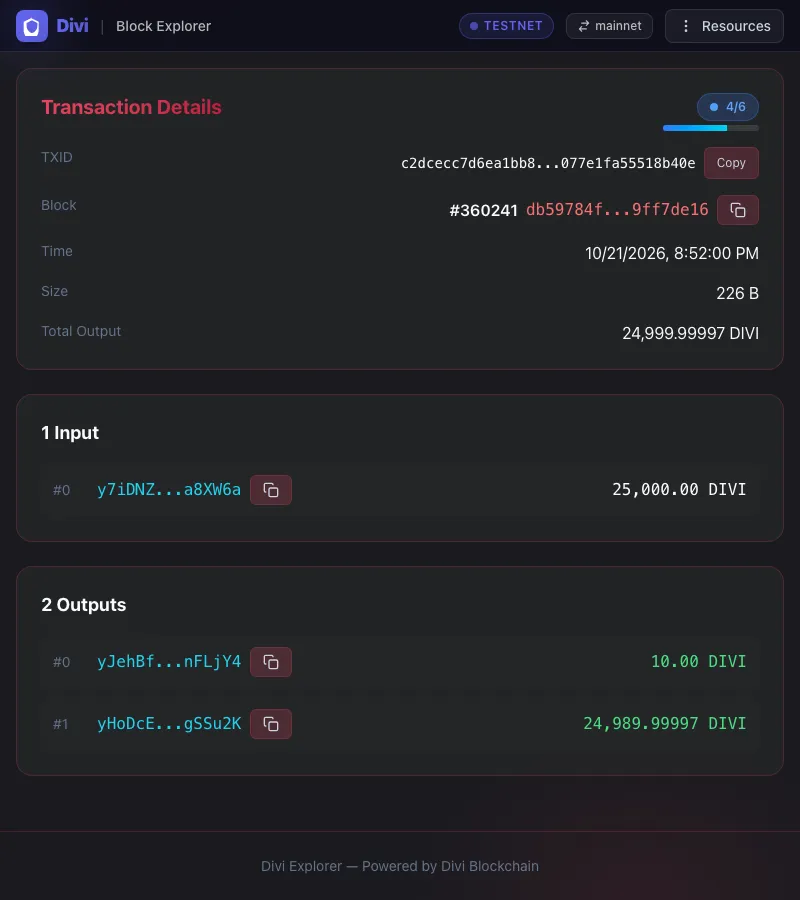
Both transactions are public. The small one is c2dcecc7…b40e and the larger one is 86bde9be…81e5.
Exchanges charge a flat fee per withdrawal, whatever the amount. On Nonkyc on 2026-10-22 that fee was 463 DIVI, about one dollar at the day's price. A test of 100 DIVI therefore costs 563 DIVI from your balance, and the second withdrawal costs another 463. For a purchase of a few thousand DIVI, weigh that against the risk; for anything larger, the test is cheap insurance.
4Fill in the withdrawal form
Every exchange's withdrawal page asks for the same things. We describe Nonkyc's because it is the exchange with real DIVI volume on the day we checked; the fields are the same elsewhere.
- Open your account's wallet or balances page, find DIVI and choose Withdraw.
- Network. If the exchange asks which network, the answer is the Divi chain itself. Nonkyc lists DIVI on a single network it calls "Divi Main Chain". There is no DIVI on Ethereum, BSC or any other network that reaches your Divi wallet.
- Address. Paste the address from step 2 and read back the first and last characters.
- Amount. Enter what you want to receive plus the fee, or use the "max" button. On Nonkyc the fee of 463 DIVI is taken from the amount you enter, so withdrawing 1,000 delivers 537.
- Confirm. Expect a two-factor code, and on the first withdrawal to a new address an email confirmation as well. Nonkyc requires two-factor authentication for adding any new withdrawal address, and locks withdrawals for 24 hours after a two-factor reset.
The withdrawal form needs an address and nothing else. If a page, a pop-up or a "support agent" asks for your 12 or 24 words, your wallet password or your private key, you are being robbed. Nonkyc's own help pages say the team never reaches out by direct message. Get help safely has the pattern.
5Watch the coins arrive
Once the exchange processes the request, it broadcasts a transaction and usually shows you the transaction id, a 64-character string. From there you can follow it yourself:
- Open Explorer 2.0 and paste either your address or the transaction id into the search box. The address page lists every transaction to and from it; the transaction page shows the amount, the block and the confirmation count. Look up an address walks through the page.
- Within a minute or two the transaction should have a block number. Each further block adds a confirmation. Your wallet shows the coins as pending at first and as spendable once it has seen enough confirmations.
- If you prefer an independent second opinion, chainz is the explorer Nonkyc itself links to, and it reads the same chain.
Exchanges process withdrawals in batches, often by hand for the first one on an account, so the gap between pressing Confirm and seeing a transaction id can be minutes or hours. The gap between the transaction id appearing and the coins being in your wallet is a minute. Once the transaction is in a block it cannot be reversed, by the exchange or by anyone.
A withdrawal that arrives in your IronDivi or Divi Desktop wallet starts staking on its own once the wallet is unlocked for staking and the coins have matured; Stake in a wallet shows how to check.
6If nothing arrives
- No transaction id yet after a few hours. The exchange has not sent. Check its status or announcements page for a wallet maintenance notice, then open a support ticket from inside your account. Nonkyc's help pages say tickets are answered within 12 hours and that support happens only through tickets.
- Transaction id exists but the explorer cannot find it. Wait ten minutes and try again; if it is still missing, send the id to the exchange's support. A transaction the network has never seen is the exchange's problem, not yours.
- The explorer shows it, your wallet does not. Your wallet is behind the chain. In IronDivi and Divi Desktop check that the wallet shows itself as synced; in a node compare
getblockcountwith the explorer's latest block. Once it catches up the coins appear. - It went to the wrong address. If the address is one you own, the coins are safe and will show when that wallet syncs. If it is not, there is no undo on any blockchain, and no one who offers to recover it for a fee can.
Ask in the official Divi community only through the places listed in Official links, and read Avoid scams first: someone claiming to be support will message you within minutes of any public question about a stuck withdrawal.
What to do next
- Stake in a wallet: turn the coins you just received into staking coins.
- Back up your wallet if you have not already; the coins are only as safe as the recovery phrase.
- Read a transaction to understand every line on the explorer page above.
- Testnet faucet to rehearse sending and receiving with coins that cost nothing.