1Where it is and what it offers
Open services.divi.domains/chatbot/. The page is one chat window titled Divi Assistant, with the line "Ask me anything about Divi blockchain development" under it and a MAINNET Context badge. The first message is the assistant's own greeting, which lists what it covers:
- Wallet setup and transactions
- RPC API commands and usage
- NFT minting and marketplace
- Block explorer and transaction tracking
- Network configuration and Tor access
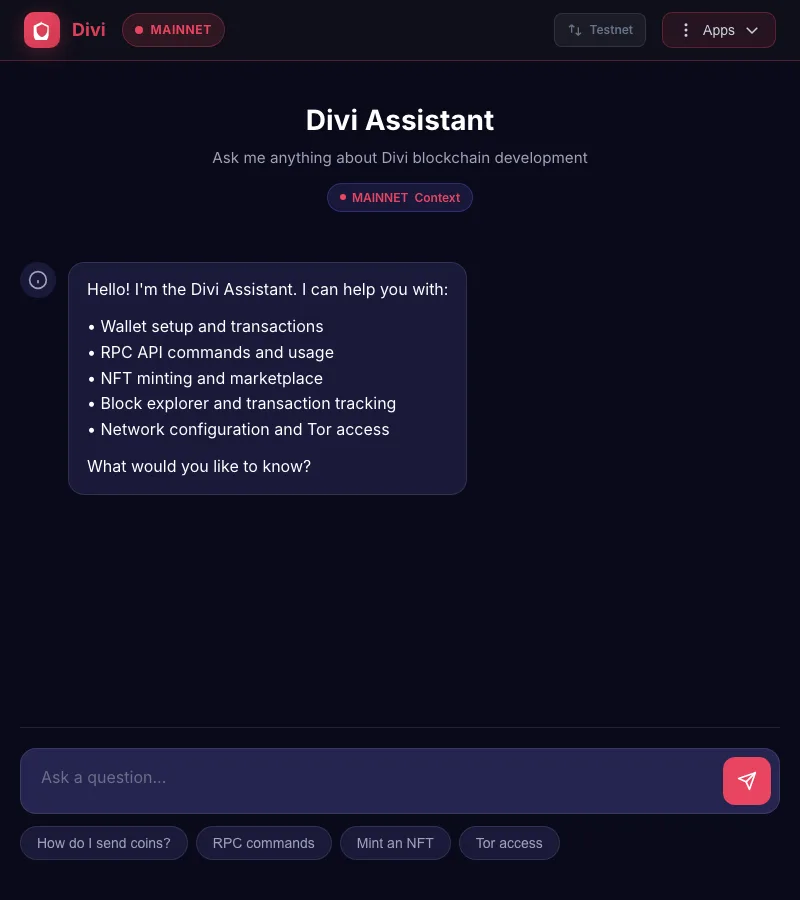
Under the input box are four suggestion buttons: How do I send coins?, RPC commands, Mint an NFT and Tor access. Tapping one puts that question in the box. The Testnet switch in the top bar changes the context badge, so answers about addresses, ports and explorers refer to the right network.
It is a search over Divi documents with an AI model writing the summary. It does not see your wallet, your balance or the live chain, and it does not know anything that is not in its documents. Keep that in mind and it is a useful first stop.
2Ask a question
- Type a plain question in the box, in whole words. "How do I back up my Divi wallet?" works better than "backup".
- Press Enter or the send button. An answer takes 15 to 25 seconds; the five questions on this page took between 16 and 24 seconds each.
- Read the answer top to bottom. It is formatted with headings, numbered steps and command boxes, and it ends with a line that starts Sources:.
- If the answer does not fit your wallet, say which wallet you use and ask again a minute later: "I use Divi Desktop on a Mac, where are the wallet files?"
Here is the first question asked for this page, at 00:32 UTC on 2026-10-22, and the start of the reply:
| You | Divi Assistant |
|---|---|
| How do I back up my Divi wallet? | The most important backup is your seed words (recovery phrase), written down and stored securely offline. For Divi Desktop, you can also copy your wallet files to a USB drive as an extra backup. … In Divi Desktop: go to Settings > Security > Backup to view your seed words. … Copy these to a USB drive: wallet.dat, backups folder, monthlyBackups folder. … Never type your recovery phrase or private key into the chat. |
That answer is right and complete for Divi Desktop, and it matches Back up your wallet. The three folder paths it gave for Windows, macOS and Linux are the ones in the Divi Desktop guides.
3Read the sources line
Every answer ends with Sources: followed by document titles. These are the documents the assistant was given for that question, and the titles tell you how fresh the answer can be. The backup answer cited "Divi Desktop Wallet Migration Between Computers", "Restoring a Broken Wallet from Monthly Backup (macOS)" and "Divi Wallet bot (@divi_wallet_bot): all commands". The staking answer cited "When Rewards? (part 3)" and two "Divi Live at 5" episodes, which are community articles from past years.
The document set, as seen in the sources of the five answers on this page, contains:
- a short core facts sheet that is attached to every question (block time, rewards, staking rules);
- Divi community articles and episode summaries ("Divi Live at 5", "When Rewards?", "Divi grows up", "Introducing Divi 3.0");
- the Divi Desktop help guides (migration, recovery, rescans) and the Telegram wallet bot's command list;
- the RPC command reference, so command names such as
getinfoanddumphdinfocome out right; - a live price lookup, which the price answer named as "CoinMarketCap".
A title like "Divi Live at 5: August 21st" is an article from years ago. If every source for an answer is that old, treat the answer as history and check the present state on Official links or the GitHub releases page. If a source is a Desktop guide or the RPC reference, the step-by-step part is usually still right.
4One question a minute
The assistant answers one question per minute from each internet address. Ask a second one too soon and the page shows an error instead of an answer. Asked directly, the service's reply on 2026-10-22 at 01:02 UTC was:
Rate limit exceeded. You can ask 1 question every 1 minute(s).
The reply also gives the number of seconds to wait. So write the whole question before you send it, and put two related things in one message rather than two: "What is the minimum stake, and does the wallet need to stay open?" counts as one question.
The limit is per internet address. On an office network, a phone hotspot or a VPN, somebody else's question can use up your minute. Wait the number of seconds shown and try again.
5Five real questions, graded
These five questions were asked on 2026-10-22 between 00:32 and 00:40 UTC and each answer was checked against the sources this slate of tutorials used on the same day. The grade is ours, not the assistant's.
| Question | What it said | How right |
|---|---|---|
| How do I back up my Divi wallet? | Seed words first, then wallet.dat and the backups folders; never type the phrase into the chat. | Right. Matches the Desktop guides. |
| What is the minimum amount of DIVI I need to stake? | "There's no minimum: since Divi 3.0 you can stake any amount." Rewards about 456 DIVI per block, proportional to stake. A 100,000 DIVI figure is outdated. | Right. Same numbers as How staking works. |
| My transaction has been unconfirmed for an hour, what should I do? | "I don't have current information on troubleshooting stuck or unconfirmed transactions specifically." Then: an hour is long at 60 s blocks, check the wallet is current and synced, download only from official sources. | Honest gap. The general advice is sound; for the real steps use Read a transaction. |
| Where can I buy DIVI? | "XeggeX exchange (DIVI/USDT pair) or directly in the DiviWallet mobile app", with a note that listings change. | Outdated. On 2026-10-22 XeggeX had no DIVI market or asset, and Divi Labs, which made DiviWallet mobile, has ceased operations (an announcement that is itself in the assistant's documents). See Where to buy DIVI. |
| What is the current Divi version and do I need to upgrade? | "The current major version in my documents is Divi 3.0. I don't have current information on the exact latest point release, so check the official website or GitHub." Then a summary of what 3.0 changed. | Honest and incomplete. Divi 3.0.0 is still the last C++ release (2023-07-14). It did not know about IronDivi, whose latest release was v0.2.5 on 2026-10-08. See Announcements and upgrades. |
A sixth question, "What is the price of DIVI right now?", came back with a live figure: $0.002143 from CoinMarketCap at 00:39 UTC, with a market cap of about $10.29 million and a table of changes over 1 hour to 1 year. CoinGecko showed $0.002189 twenty minutes later, so the number was current. The same answer then repeated the XeggeX listing, which shows the pattern: live lookups are fresh, document-based claims are as old as the document.
6What not to type, and what not to trust
- Never type a recovery phrase, private key or wallet password. The assistant says this itself. Nothing you send is private: the question goes to a server and on to an AI model. A phrase typed there is a phrase to treat as stolen.
- Do not paste an address and ask "is this mine?". The assistant cannot see the chain. Use Look up an address on the explorer instead.
- Never act on a "send coins to this address" instruction, from the assistant or from anyone quoting it. No upgrade, migration or support step in Divi asks you to send coins anywhere.
- Check anything about exchanges, prices, dates and versions against Official links. Those facts change; the documents behind the assistant are updated now and then, not daily.
- Treat command lines as a starting point. Run RPC commands on testnet first, as every tutorial on this site does. A wrong command name fails harmlessly; a wrong amount on mainnet does not.
If the answer starts "I don't have current information", or if the question is about your own coins being missing, go to the official Telegram group and ask there. Get help safely explains how to do that without being scammed, and Official Telegram gives the one link.
What to do next
- Get help safely: where real help comes from and how support scams work.
- Official links: the checked list to verify any link or claim against.
- Announcements and upgrades: how to find the real current version.
- Back up your wallet: the full version of the assistant's best answer.