1What a required update is
Every Divi wallet runs a copy of the same rules. Now and then the rules change on a fixed date: a hard fork. A wallet that has not been updated by that date cannot follow the chain after it.
The last one was Divi 3.0.0. Its release page, published on 2023-07-14, says: "This MANDATORY update activates hardfork features on time stamp 1692792000 (Aug 23, 2023)". That gave everyone 40 days.
IronDivi releases since then have been ordinary ones. Their release notes are a list of changes, with no date you must meet. A required update says so in its notes, in words like "mandatory" and a date.
2Where updates are posted
There is no single place. The project channels carry big news; each wallet's releases page carries its own new versions. Here is what each one showed on 2026-10-22:
| Where | Latest |
|---|---|
| Divi Announcements (Telegram channel) Project news; it posted the 3.0.0 release link on 2023-07-14 | Year-end update, 2025-12-23. No IronDivi release has been posted there. |
| Divi blog Community updates | "Divi Community Update March 5th 2025" |
| @DiviProject on X Project news | Not checked: X shows posts only after you sign in |
| IronDivi releases Every IronDivi version | v0.2.5, 2026-10-08 |
| BoxWallet releases Every BoxWallet version | v0.8.38, 2026-10-20 |
| Divi Core releases The original node program | v3.0.0, 2023-07-14 |
| Divi Desktop releases The desktop wallet | Divi Desktop 2.0.0, 2023-06-22 |
So if you run IronDivi, the releases page is the only place its new versions appear. The Telegram channel is still the place a required, network-wide update would be announced, as 3.0.0 was.
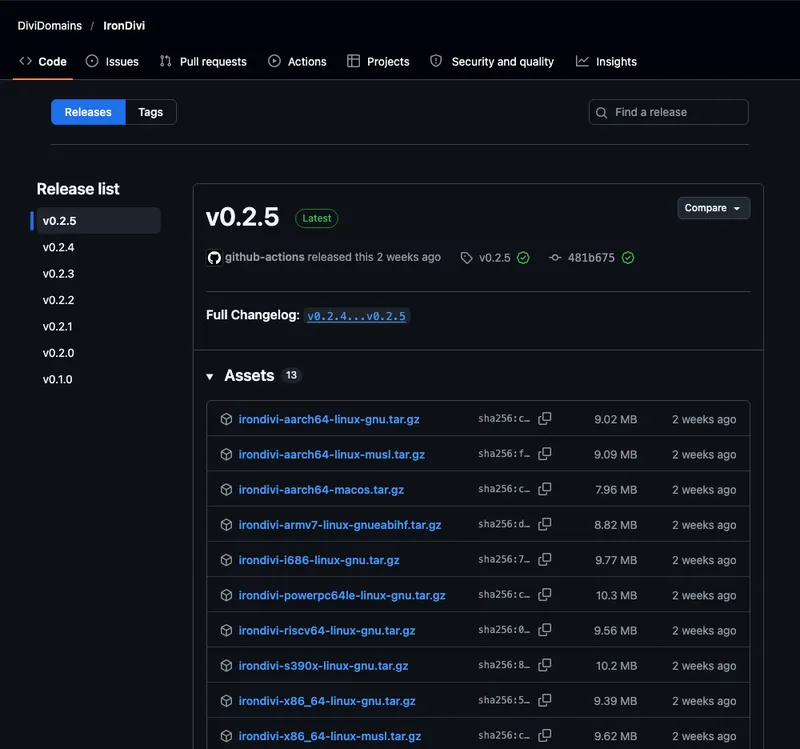
sha256: value next to it; you will use it in step 6.3Get told automatically
- Join the announcements channel. Open t.me/diviannouncements in Telegram and tap Join. Only the project posts there, so it is quiet. Check you have the real one on Official Telegram.
- Follow the releases feed of your wallet. Every GitHub releases page has a feed you can add to any feed reader, with no account. For IronDivi it is
github.com/DiviDomains/IronDivi/releases.atom. Add.atomto the end of any releases address above to get its feed. - Or watch the project on GitHub. With a free GitHub account, open the releases page, click Watch, choose Custom, tick Releases. GitHub then emails you each new version.
Here is the start of the IronDivi feed as we fetched it, no sign-in:
# release title, then its date
v0.2.5  2026-10-08
v0.2.4  2026-10-07
v0.2.3  2026-03-30
4Check which version you run
IronDivi. Ask the program itself, or ask the running node. On our testnet node:
# the program file on disk
irondivid --version
irondivid 0.2.6

# the node that is running now
# (leave out --testnet on mainnet)
irondivi-cli --testnet getnetworkinfo
  "subversion": "/IronDivi:0.2.6/"
Do not go by getinfo. On IronDivi it says 3.0.0.0: that is the Divi version it is compatible with, not the IronDivi version. The subversion line is the one to quote when you ask for help.
BoxWallet checks for its own updates and downloads the Divi 3.0.0 node for you; see Run a node with BoxWallet. Divi Desktop's newest release is 2.0.0 from 2023; if your copy is older, download that one.
Being connected proves nothing. Our node had nine peers: eight on Divi 3.0.0 and one still on IronDivi 0.1.0, six releases behind the latest. Compare your version with the releases page instead.
5Check you are on the right chain
A node that missed a required update falls behind or follows the wrong chain. Two numbers tell you: the height and the hash of the newest block. Compare them with Explorer 2.0 for mainnet, or the testnet explorer.
# newest block number
irondivi-cli --testnet getblockcount
360845
# its hash (first and last digits)
irondivi-cli --testnet getbestblockhash
4fd7d150...3f821c7ea6
At 10:52 UTC on 2026-10-22 both numbers matched the public testnet node exactly. A height one or two blocks apart is normal for a minute: a new block arrives about every minute. A height that stays behind, or the same height with a different hash, means your node needs attention. The explorer tour shows where the height is on the front page.
6Upgrade a node safely
Upgrading IronDivi means replacing one program file. Your wallet and the chain live in the data folder, which you keep. We did this on our own testnet node on 2026-10-22.
- Back up first. Make sure your recovery phrase is in your password manager (Back up your wallet). Try a new version on testnet before mainnet.
- Download from the releases page, the file for your computer. Never from a link someone sent you.
- Check the file. Run
sha256sumon it (on a Mac,shasum -a 256) and compare with thesha256:value on the releases page. Ours matched:cda18c3c…30445for the v0.2.5 Linux musl file. - Stop the node, and check it really stopped. Run
irondivi-cli stop, then wait for the program to end. In our test it answered "Divi server stopping" but kept running, on both 0.2.5 and 0.2.6.killwith its process number (find it withpgrep irondivid) stopped it cleanly in 5 seconds; the log ended with "IronDivi shutdown complete". If it runs in a window of its own, Ctrl+C there works too: ours logged "Received Ctrl+C" and shut down cleanly in 2 seconds. - Start the new program with the same data folder and the same options as before.
- Check the version, the height and the balance.
Here is what our node showed. We moved it to the published v0.2.5 file; going to a newer version works the same way.
# before the swap
/IronDivi:0.2.6/
height 360835
balance 23989.99994

# after, same data folder
/IronDivi:0.2.5/
height 360844
balance 23989.99994
The node answered again 25 seconds after starting, caught up with the network, and the wallet was untouched. Install IronDivi has the full download and start commands; Upgrade a node covers more cases.
7Fake upgrade messages
"Upgrade" and "migration" are favourite words of scammers, because a real required update creates urgency. A real one never needs anything from you except installing a new program.
Enter your recovery phrase into a form or a "migration tool". Send coins to a "swap address". Download a wallet from a link in a private message. Install a browser extension to "keep your coins". Your coins are on the chain; they do not move when you upgrade.
If a message says you must act, check two places: the releases page of your wallet and the announcements channel. If neither mentions it, it is not real. Avoid scams lists the common tricks.
What to do next
- Install IronDivi: download, check and start the node this page upgrades.
- Official links: every real Divi channel, checked, to bookmark.
- Get help safely: what to share when an update goes wrong.
- Back up your wallet: the step to do before any upgrade.