1The two official places
| Address | Name shown | What it is (2026-10-21) |
|---|---|---|
| t.me/diviproject | Divi (Official) | The public group where people talk and ask questions. 2,299 members, 85 to 92 online when we looked. |
| t.me/diviannouncements | Divi (Official) Announcements | A read-only channel for news from the team. 715 subscribers. Its description reads "This is the only official announcement channel for the Divi Blockchain." |
Both are linked from diviproject.org: the site's Telegram button sends you to the group. That link from the project's own website is what makes them official, not the word "Official" in the name, which anyone can type.
In a group everyone can post. In a channel only the owners post and you can only read. Join both: the channel for news you must not miss (see Announcements and upgrades), the group for help.
2Join from the website, not from a search
- Install Telegram on your phone or computer from telegram.org or your app store, and sign up with your phone number. Telegram is free.
- Type
diviproject.orginto your browser yourself. Scroll to the bottom of the page and press the Telegram icon. It opens t.me/diviproject. - Press View in Telegram, then Join at the bottom of the chat. Nobody has to approve you.
- For the announcement channel, open t.me/diviannouncements and press Join.
Searching inside Telegram for "Divi" shows several results with the same logo and name. Searching is how people end up in the wrong one.
3Tell the real group from a copy
On 2026-10-21 there was a second group called "Divi (Official)" with the same logo at the address t.me/DiviProjectOfficial. It had 12 members and it is not linked from the website. We are not saying who runs it or why; the point is that the name and picture prove nothing.
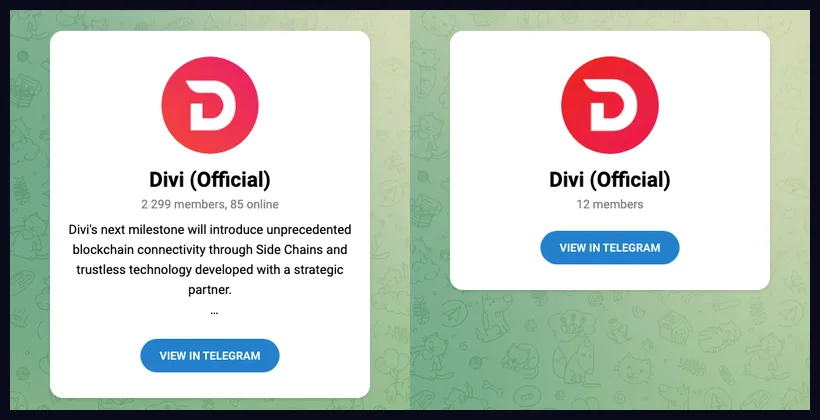
What to compare, in order:
- The address. Open the group's profile and read the link under its name. The real one ends in
/diviproject, exactly. A copy will differ by a letter, a word or an underscore. - Where you got the link. From the website: fine. From a search, an advert or a stranger's message: check the address again.
- The member count. A copy usually has a few dozen members, or thousands of silent ones. Thousands with real daily conversation is harder to fake, but still not proof on its own.
- Who posts the news. Real announcements appear in t.me/diviannouncements. Anyone forwarding "urgent" news only in private is not the team.
4Three settings before you say hello
The moment you post a question in any crypto group, impostors read it and message you privately pretending to be support. These settings stop most of that.
- Hide your phone number. Settings → Privacy and Security → Phone Number → Nobody.
- Limit who can message you. Settings → Privacy and Security → Messages (on some versions "New chats from unknown users") → restrict to contacts, or turn on the paid-messages / archive option your version offers for unknown senders.
- Hide your last-seen and profile photo from everyone but contacts, in the same Privacy menu.
Menu names move between Telegram versions, so look for the Privacy section rather than the exact words. Then make one rule for yourself: never continue a Divi conversation in a private chat that someone else started. Real helpers answer in the group where everyone can see.
Your recovery phrase or seed words, your wallet password, a private key, your wallet.dat file, or a screenshot of any of them. Not an admin, not "support", not a bot, not a form. Anyone asking is stealing. Get help safely explains what you can share.
5What to expect inside
- Read the pinned message first. Groups pin their rules and the links they consider official.
- Ask in public, with details. Which wallet (IronDivi, Divi Desktop, BoxWallet), which version, what you did, the exact error. A transaction id or an address is safe to post.
- Expect a wait. It is a volunteer community spread across time zones. Hours is normal.
- Mute, don't leave. Press the group name → Mute. You keep access without the pings. Leave notifications on for the announcement channel.
- Nobody there sells DIVI. Offers to buy or sell privately, "giveaways", "staking pools with double rewards" and wallet "sync" links are all scams. Report and block.
6The IronDivi wallet bot
There is also a Telegram bot, @divi_wallet_bot, named "IronDivi Wallet". It is made by Divi Domains, the people behind IronDivi and this site, not by the Divi project. It opens a wallet app inside Telegram; your keys stay in that app on your device and the bot never holds them. Like every official account, it will never ask you to type a recovery phrase into the chat. If you want to try it, start on testnet: Testnet wallets.
If something goes wrong
| Problem | What to do |
|---|---|
| Someone messaged me privately claiming to be Divi support. | Do not reply. Block and report the account (open their profile → Report → Scam). Post in the group that it happened, without the link they sent. |
| I already typed my recovery phrase somewhere. | Treat the wallet as stolen. Make a new wallet right now and move everything to it: Create a wallet, then Send DIVI. |
| The group I'm in has the right name but a different address. | Leave it. Join from diviproject.org as in step 2. |
| I can't see the group in search. | Use the link, not search: t.me/diviproject. |
| Telegram is blocked where I live. | The same news is on X and the Discord, both linked from the website. Official links has the full list. |
Next: Official links · Get help safely · Avoid scams · Ask the Divi chatbot.